
How do I copy macros from one Zendesk account to another?
Short answer
Install Macro Transfer in both accounts. Export the macros as JSON from the source, then import the file in the destination: preview it, run a trial on a few macros, and import the rest.
How to do it with Macro Transfer
- Export from the source accountOpen Macro Transfer, choose Export macros, select Load macros, select the macros and download JSON.
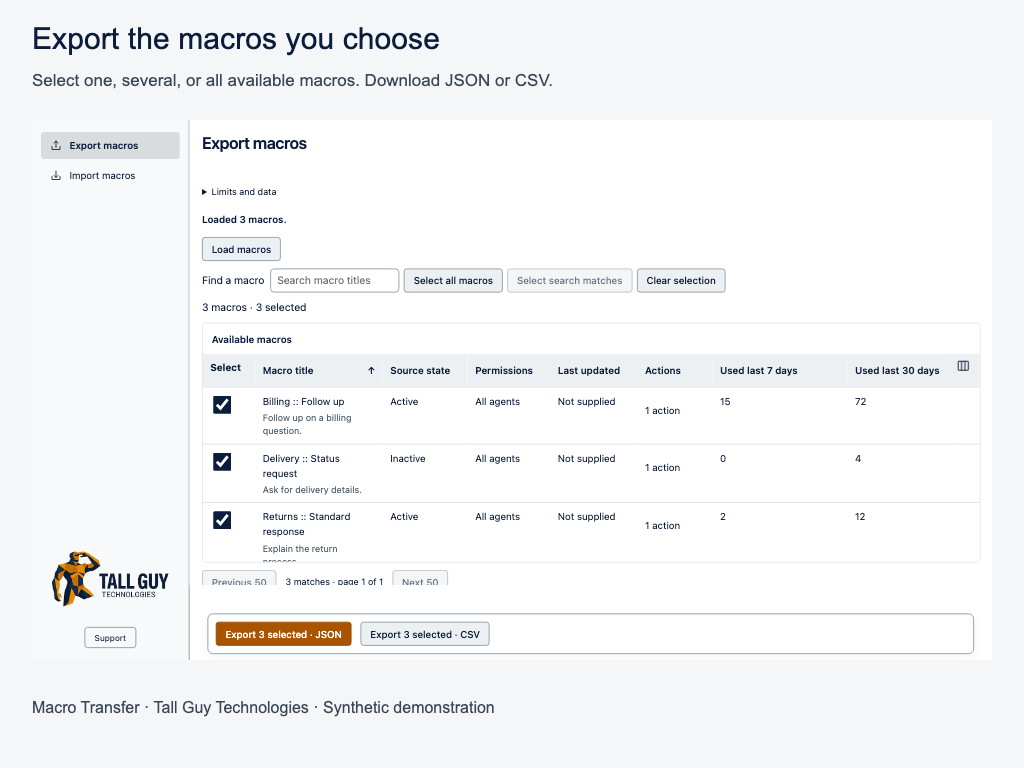
- Keep that file unchangedIt’s your backup if you need to compare or start again.
- Import in the destination accountChoose Import macros and pick the file. Read the preview; nothing is saved yet.
- Run a trial on 1–5 macrosChoose Trial import, confirm, and check those macros in Zendesk.
- Import the rest and download the journalSelect the remaining ready rows, choose Import selected, then download the journal before you close the app.
Why it matters
Zendesk has no built-in way to copy macros between accounts. Re-creating them by hand or scripting the API is slow, and it’s easy to overwrite the wrong macro or switch on an unfinished one for every agent.
Tip: New macros import as Inactive by default, so agents don’t see them until you’re ready. Restricted macros whose groups or users don’t exist in the destination are blocked.
 Macro TransferCopy and bulk-edit Zendesk macros · read the full guide
Screenshots use made-up companies, people and tickets.